
Multi-Session Pre-Authorization with External Settlement
This guide explains the Multi-Session Pre-Authorization with External Settlement flow. This method allows for multiple transactions to be manages in parallel with an external server who manages the settlement process for each of the transactions (decides when the settlement would take place and for what final price).
PrerequisiteFor this flow to function, the ExternalSettlement setting must be enabled by Nayax.
Configuration & Device Behavior
Once enabled, the Nayax Engine changes how the physical device handles transactions:
- The device will not send its own settlement command after a successful authorization.
- The transaction remains unsettled until an external request is received.
- The only way to settle a transaction is via the ExternalSettlement command.
- For Multi-session flows, the "Close Session" command is no longer relevant; use ExternalSettlement instead.
This provides integrators the flexibility to trigger the settlement stage externally according to their own business logic, supporting all flow types (Pre-Selection/Pre-Authorization).
The following table has the technical requirements based on the feature:
| Feature | Requirement |
|---|---|
| Settlement Window | Transactions must be settled within 48 hours of initiation. |
| Expiry | Settlement attempts performed after the 48-hour window will fail. |
| Auto-Cleanup | Transactions unsettled for >48 hours are automatically canceled via card scheme regulations (this should not be relied upon). |
| Incremental Auth | The final settlement price must not exceed the Maximum Default Credit set for the operator/machine. |
Incremental AuthorizationExternal Settlement supports Incremental Authorization. Ensure your logic adheres to the Maximum Default Credit limits to avoid settlement failure. More on this in the Incremental Authorization documentation.
Managing Unsettled Transactions
When no product or service is provided, proactive management of the transaction is required to maintain a good user experience.
- External Cancel: If it is known that no settlement will occur, you must send an External Cancel immediately.
- Consumer Impact: If a transaction remains authorized without being canceled or settled, the consumer’s funds will stay captured on their payment method, leading to potential disputes.
Multi-Session Payment Flow
The following sequence illustrates the complete journey for a multi-session session:
Initiation of transaction
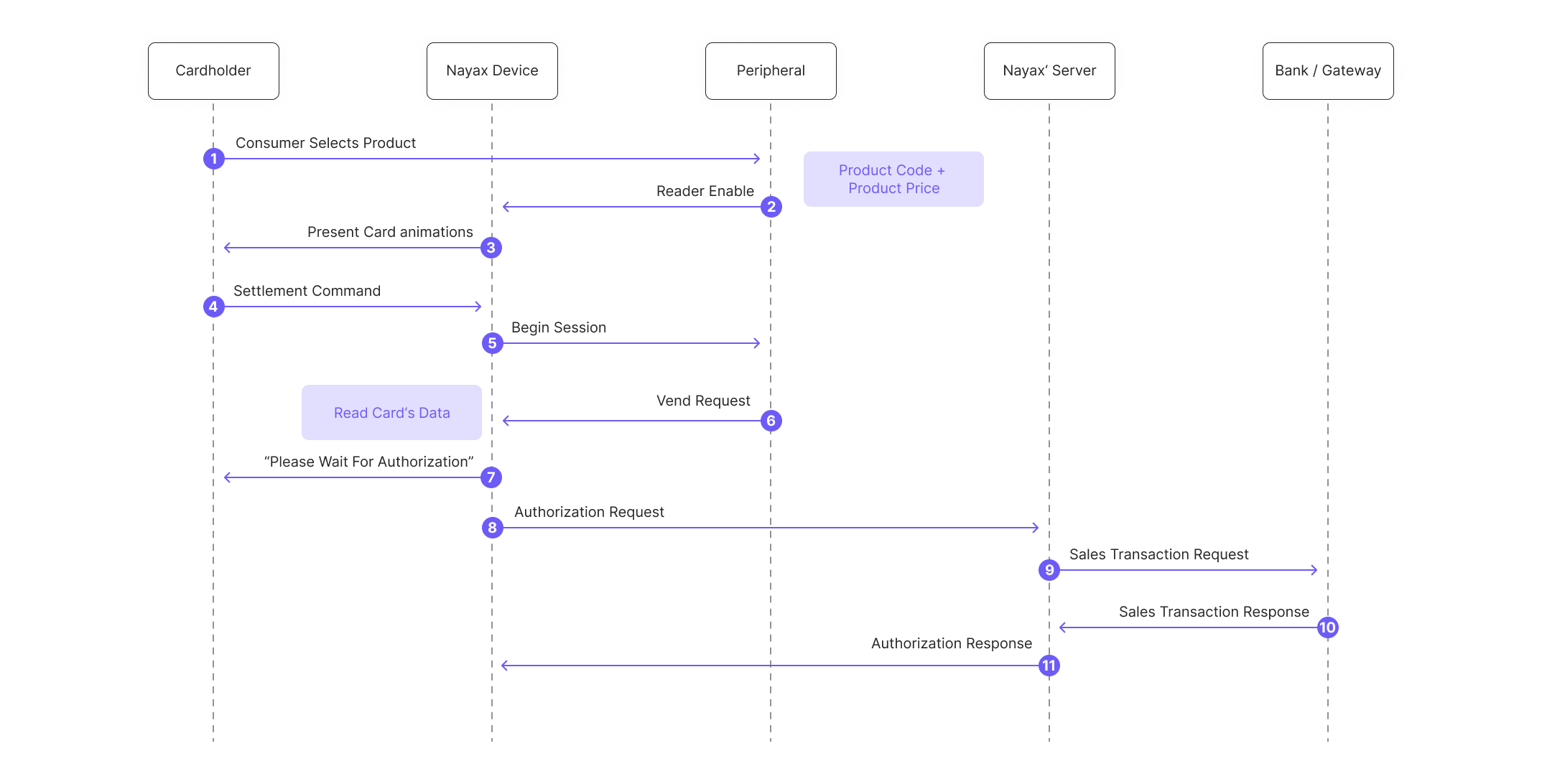
- Cardholder selects an item on the peripheral.
- Peripheral sends
Reader Enableto VPOS Touch. - Nayax's device displays "Present Card" animations to the Cardholder.
- Cardholder presents payment.
- Nayax's device sends
Begin Sessionto the peripheral and the peripheral's SDK triggers the "session begin" event:This is the signal for the peripheral, such as the vending machine, to prepare for payment approval.vmc_vend_events() (via onBeginSession(funds_avail))vend_callbacks(onBeginSession(funds_avail))vmc_vend_event_handler_cb(vm_vend_event_on_session_begin)m_sessions[0] = new vmc_vend_t.vend_session_t((short) 0, 1, (byte) 0, 10); //the fields are (from left to right): produce code (2 bytes long,meaning value up to 65535), quantity (2 byte), unit of measure (1 byte), price (2 bytes, meaning value up to 65535)List<vmc_vend_t.vend_item_t> list = new List<vmc_vend_t.vend_item_t> (); list.Add(new vmc_vend_t.vend_item_t(0, 10, 1, 1)); //the fields are (from left to right): produce code (2 bytes long,meaning value up to 65535), price (2 bytes, meaning value up to 65535), quantity (2 bytes), unit of measure (1 byte), . session = new vmc_vend_t.vend_session_t(list);session_product.code = 1; session_product .qty = 1; session_product.price = 10; session_product.unit = 1; session->products = &session_product; session->total_products = 1; - The machine display shows: "Please Select a Product." and the customer selects a product- prompting the peripheral's SDK to send a
Vend Requestto the Nayax Device.m_vmc.vend.vend_request(m_sessions[m_active_session]);vmc_instance.vend.vend_request(session);vmc_vend_vend_request(session); - The device displays "Please Wait For Authorization".
- The device contacts Nayax’ Server.
- Nayax’ Server forwards request to the Bank/Gateway.
- Bank/Gateway returns approval/decline.
- Nayax’ Server sends an authorization response.
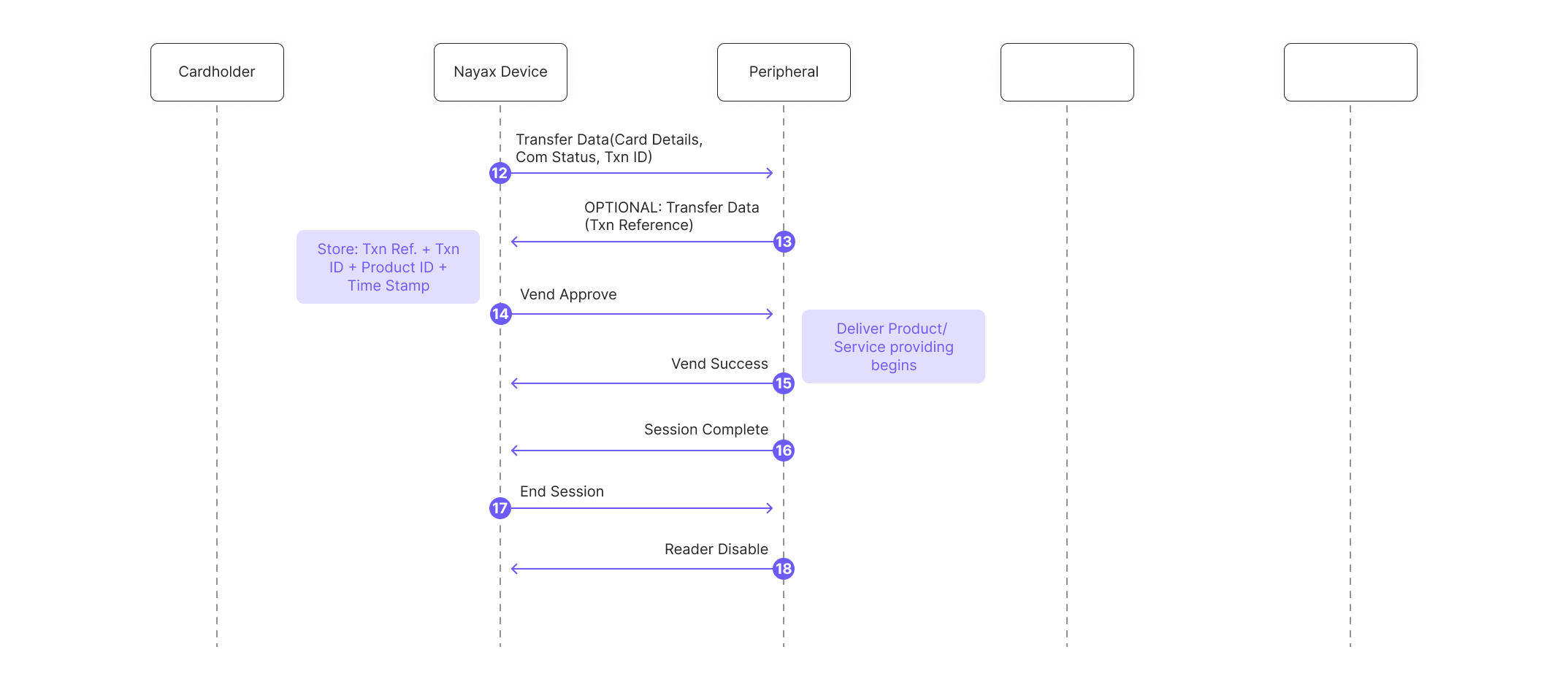
- The peripheral's SDK handles transaction data received via
Transfer Datacommand (includes Nayax Transaction ID and card details):
vmc_vend_events() (via onTransactionInfo(data))vend_callbacks(onTransactionInfo(data))vmc_vend_event_handler_cb(vm_vend_event_on_transaction_info)At this point, the peripheral must retain the (Nayax's) Transaction ID and Site ID received for later use in the External Settlement/External Cancel.
- Optional: The peripheral's SDK can respond to Nayax's device with its own Transaction number (this information won't be used anywhere, just in case the peripheral would like to have its own Transaction ID appearing in the SDK's logs).
- Nayax's device sends
Vend Approved, triggering the peripheral's SDK "vend approved" event:vmc_vend_events() (via onVendApproved(session))vend_callbacks(via onVendApproved(session))vmc_vend_event_handler_cb(vm_vend_event_on_vend_approved) - The peripheral dispenses the product or provides the service to the consumer, and the SDK reports
Vend Successand completes the local session:onVendApproved(session)onVendApproved(session)vmc_vend_vend_status(&session, __true)` and `vmc_vend_vend_session_complete_lowlevel() - The peripheral sends
Session Completeto indicate completion of the ongoing transaction process (not yet settling it). - Nayax's device sends
End Sessionto the peripheral. - The peripheral sends
Reader Disableto put the reader in standby.
Settling the transaction (External Settlement)
Important NoteIf External Settlement is enabled, the terminal's standard "Close Session" behavior is altered. You must rely exclusively on the External Settlement or External Cancel APIs to manage the financial lifecycle of the transaction.
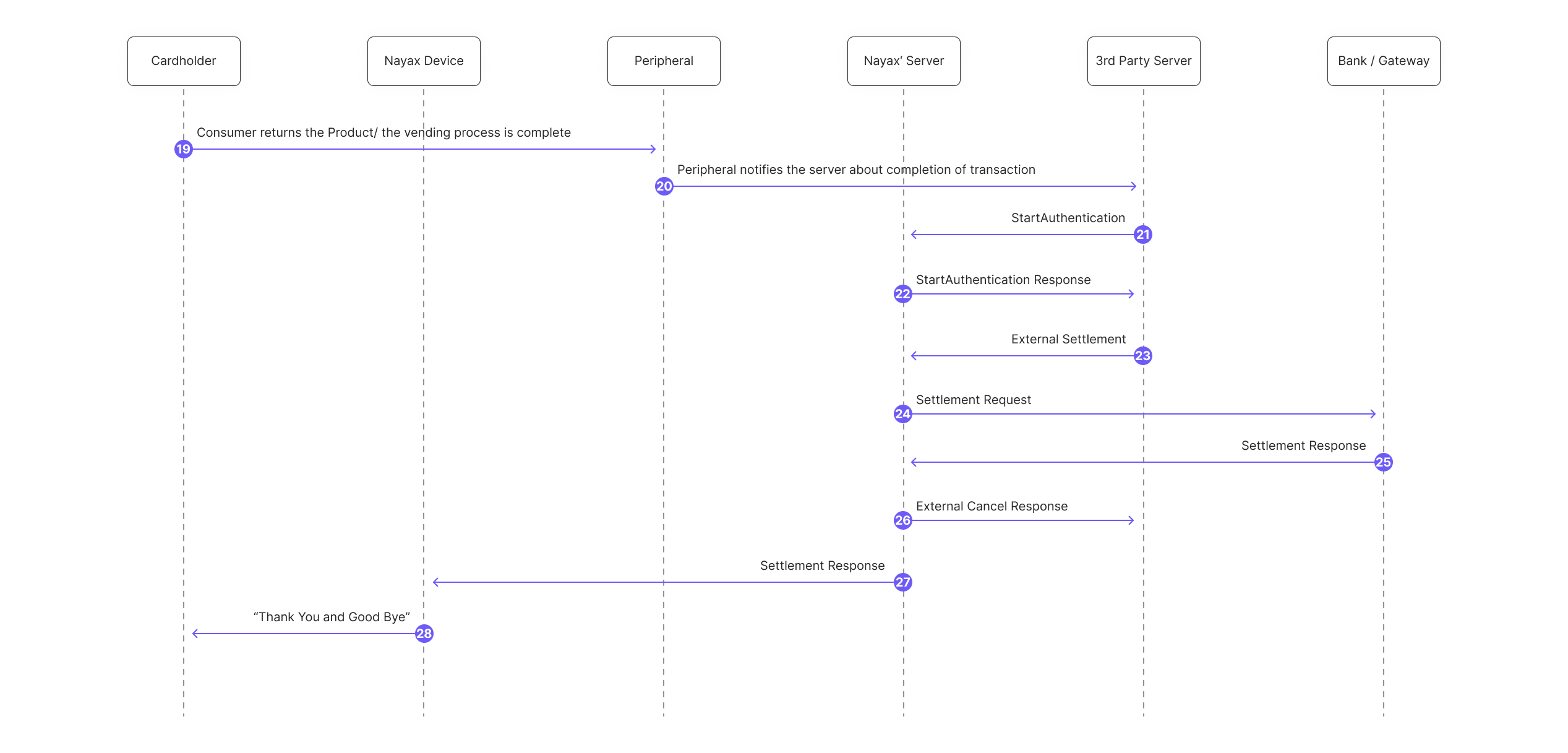
If the service was provided:
- Cardholder finishes interaction or returns the product.
- Peripheral notifies Nayax’ Server the process is complete.
- 3rd Party Server initiates auth with Nayax’ Server.
- Nayax’ Server confirms authentication status.
- 3rd Party Server requests final settlement.
- Nayax’ Server sends the capture request to the Bank/Gateway.
- Bank/Gateway confirms the funds transfer.
- Nayax’ Server confirms status to the 3rd Party Server.
- Nayax’ Server sends final settlement status to Nayax' device.
- Nayax's Device displays "Thank You and Good Bye" to the Cardholder.
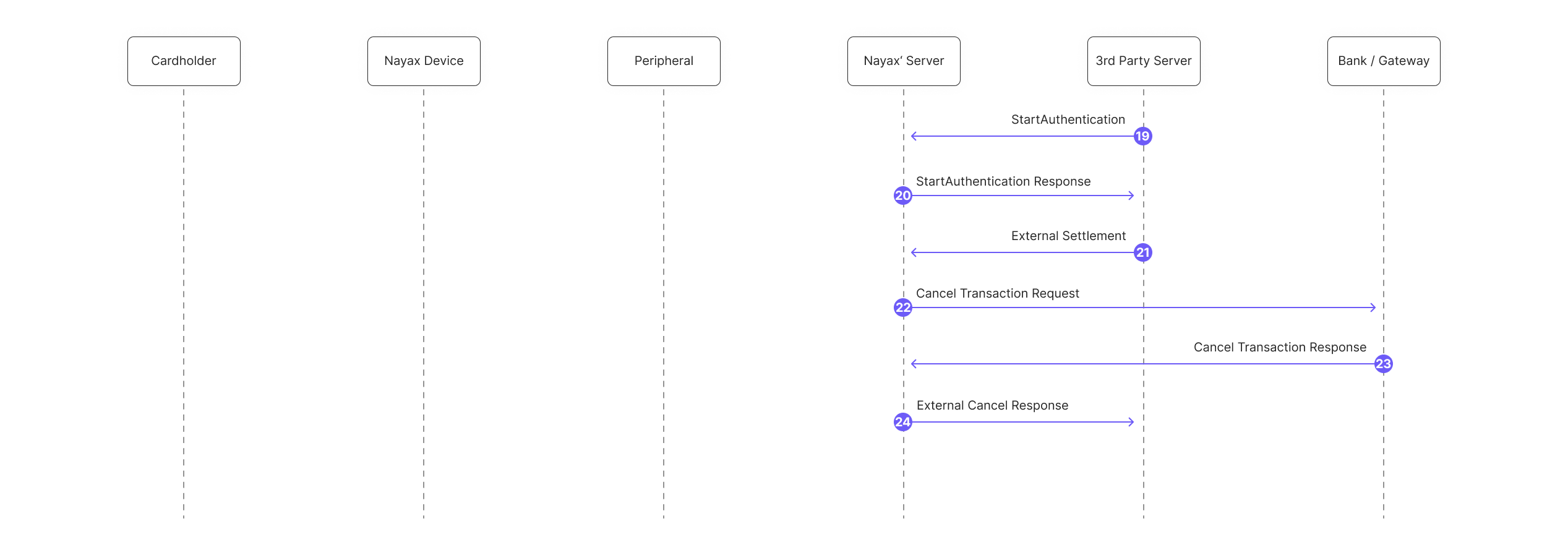
If the service was not provided:
- 3rd Party Server requests auth from Nayax’ Server.
- Nayax’ Server confirms.
- The 3rd Party Server triggers a settlement or state change.
- Nayax’ Server requests a void from the Bank/Gateway.
- Bank/Gateway confirms the cancellation.
- Nayax’s Server notifies the 3rd Party Server of success.
Updated about 3 hours ago