
Flow & Configurations
Vend Result Timeout (Timeout for Vend Success)
This parameter sets how long the device will wait for a vend response ("Vend Approved"/"Vend Failure") from the peripheral after sending "Vend Approved" to it. The parameter's value in Nayax Core has a max value of 65535 seconds (18 hours 12 minutes and 15 seconds). Should you need a longer lap than that, you can use Multi-Session, in which the timeout for credit cards are 23 hours (can be up to 72 hours as of 2025), and for proprietary cards it's 72 hours.
Status Command
Once the pairing process is complete, the device will immediately send a "Status" command when network communication is lost, so the machine knows. It would look something like this in the Java SDK (same look in C# and C):
[1760613771245+(      7476ms)]        vmc_link: rx
vmc_link :rx :0d:00:01:04:00:36:01:30:0b:15:01:00:08:37:92:
[1760613771245+(         0ms)]        vmc_link: tx
vmc_link :tx :0a:00:00:04:01:30:00:36:00:00:4c:6b:
[1760613771245+(         0ms)]      vmc_vend_t: received status: 21
[1760613771251+(         6ms)]            Main: device not available: in technician mode

[1760613771251+(         0ms)]    vmc_socket_t: received status: 21
You can see that the status is 21 (0x15), which, as the table below shows, means the device is unavailable (and the following bytes indicate why).
Status ID | Description |
|---|---|
20 | Device in Idle mode, available for starting a transaction |
21 | Device not available |
Once the communication is resumed, and the device goes back to idle, a Status command of value 20 would be sent:
[1759994336421(+7ms)] : rx:
0d:00:01:02:00:36:01:30:0b:14:01:00:00:34:16:
[1759994336424(+3ms)] marshall_t: received status
[1759994336426(+2ms)] : tx:
0a:00:00:02:01:30:00:36:00:00:69:ca:
[1759994336431(+5ms)] vmc_vend_t: received status: 20
[1759994336431(+0ms)] APP: received status: 20
[1759994336433(+2ms)] APP: device available
[1759994336434(+1ms)] vmc_socket_t: received status: 20
So to sum it up: The device lost communication with the outside world (SIM does not work/ETH connection is faulty, etc.) -> peripheral sends "keep alive"s and the device responds to it -> device sends "Status" command with value of 21 [0x15])
The device resumes communication with the outside world -> peripheral sends "keep alive"s and the device responds to it -> device sends "Status" command with the value of 20 [0x14])
In addition, unrelated to the information above, the Status command can provide you with information during the consumer's card presentation:
| Status ID | Description |
|---|---|
54 | Call your Bank |
56 | Card Error (Reader not able to read card) |
61 | Insert Card into the Contact slot |
62 | Card not Accepted |
65 | Processing error (Card has been removed before completion of the transaction in Contact) |
66 | Remove Card from the Contact slot |
67 | Use Contact Reader |
68 | Use Magnetic Stripe Reader |
69 | Try again |
71 | Present Card |
73 | Card read OK |
74 | Insert card in Contact or Swipe |
75 | Present ONE card only |
78 | Use another Card |
79 | Insert card in Contact |
82 | Look at your mobile (consumer is completing the transaction on its mobile phone) |
83 | Present Card Again |
84 | Insert or Swipe another card |
Should the consumer have issues with the card reading he would be prompted to insert the card or use another card, but if the card does not have enough credit it won't show up on the screen as we wouldn't want to embarrass our consumer (and we won't show it on the SDK logs as this is not related to the communication between the VPOST and the machine but somewhat between the device and the acquirer). Generally speaking, you can see the reasoning for a transaction being cancelled/ a card being rejected in Nayax Core.
Communication Loss
The Marshall protocol uses ACK commands in response to each command sent, meaning that if your peripheral sends a command to the device, it will receive an ACK command in return, and vice versa. This command is a response from the receiving side to the sender, indicating that the command was received. If no ACK is received, the command is transmitted twice. If none of the three attempts (original command + 2 retries) received an ACK, the SDK stops sending keep-alive commands, and the device sends a reset command to re-establish the pairing process.
ACKs not received during transaction: If no ACKS were received after "Vend Success," it's Nayax's responsibility to make the settlement. If no ACKS were received after the authorization or before the "Vend Success," Nayax would cancel the transaction. (If ACKs were not received before the authorization stage, the transaction is cancelled as well)
Approval by 3rd Party Server - How the Machine Notifies the SDK Whether or Not the Card Is Approved
After the "Vend Request" is sent and a consumer presents his card the Transfer Data command would be sent and the peripheral would get the card's details and would forward them (on it's own, unrelated to the SDK) to the desired 3rd party server. Once the server has approved/ denied the card, the peripheral would notify the SDK (and that way it would also inform the device) through calling the "client_gateway_auth(bool approved)" command:
m_vmc.vend.client_gateway_auth(bool approved);vmc_instance.vend.client_gateway_auth(bool approved);vmc_vend_client_gateway_auth(__bool approved)In the SDKs' demo apps, they would simulate a case in which the peripheral would return the value of "approved" ( the function would return "true"):
public void onSessionBegin(int funds_avail)
{
    // credit card has been detected. stop timer
    session_timer_stop();

    // delayed vend example: send vend request later, and not now inside onBeginSession
    if (false)
        vend_timer_start();
    else
    {
        // vend request
        m_vmc.vend.vend_request(m_sessions[m_active_session]);

        // example: approve mifar/mag card externally (vmc authenticates)
        if (vmc_config.mag_card_approved_by_vmc_support || vmc_config.mifare_approved_by_vmc_support)
            m_vmc.vend.client_gateway_auth(true);
    }
}
            public override void onSessionBegin(int funds_avail)
            {
                logger.d(TAG, "session began. requesting product vend");

                // do vend request
                vmc_instance.vend.vend_request(session);

                // todo: check if this is a mifare / mag card
                // todo: usually you will send this to another thread for async processing
                if (false)
                {
                    // acknowledge mifare (note: only when machine is working on mifare/mag mode)
                    if (vmc_config.mifare_approved_by_vmc_support || vmc_config.mag_card_approved_by_vmc_support)
                        vmc_instance.vend.client_gateway_auth(true);
                }
            }
static void triggered_vend_request(void)
{
.
.
.
if (config.mag_card_approved_by_vmc_support || config.mifare_approved_by_vmc_support || config.qr_approved_by_vmc_support)
{
vmc_vend_client_gateway_auth(__true);
}
}
Cancel Command
Should you send "vend request" and have not yet received "vend approve"(/"vend denied"), you can send the "cancel" command, which would cause "vend denied" to be sent.
Should you have sent the "cancel" command before receiving "vend approved" yet the "vend approved" was already being sent to your machine- you wouldn't see the "vend cancel" printed in the logs as you cannot have a "cancel" command after "vend approved", hence "vend failure" would be sent from the peripheral's end. You can also avoid using "cancel" at this point and respond with "vend failure", which would yield the same result.
You can also cancel a transaction before sending the "vend request" if the consumer wanted to start a transaction but then backed out before you've sent the "vend request" (either before presenting a card or right after you've received "begin session" before you were able to send out the "vend request"- should it be the 1st option all you'd see is "reader enable" in the SDK's logs).
Begin Session Being Sent Only After the Card's Authorization
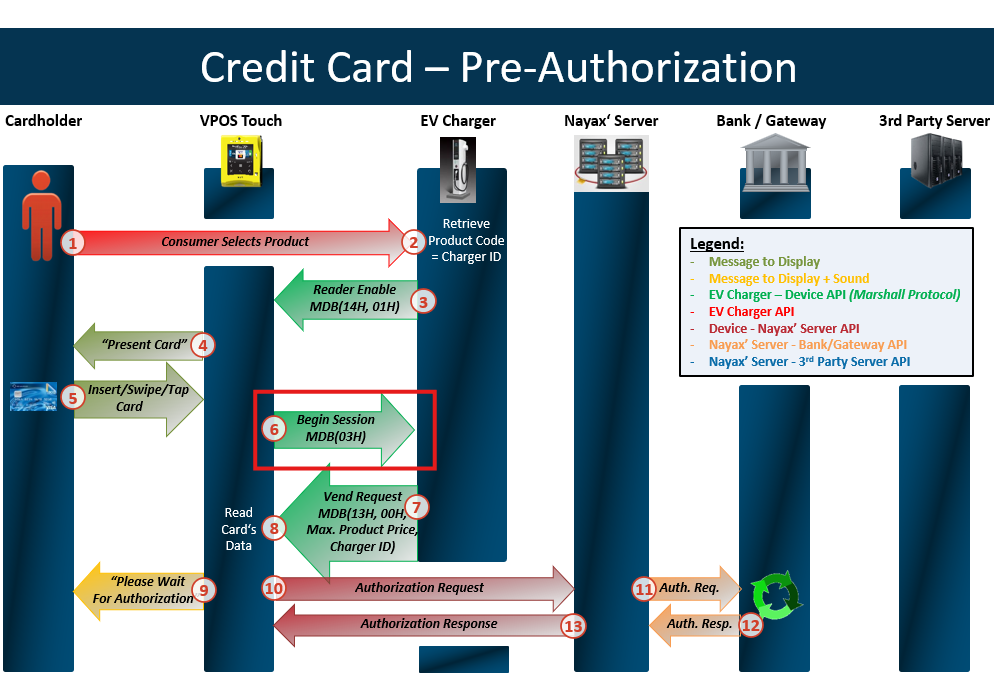
When using Prepaid cards, the authorization would come first, and the "begin session" would be sent afterwards.
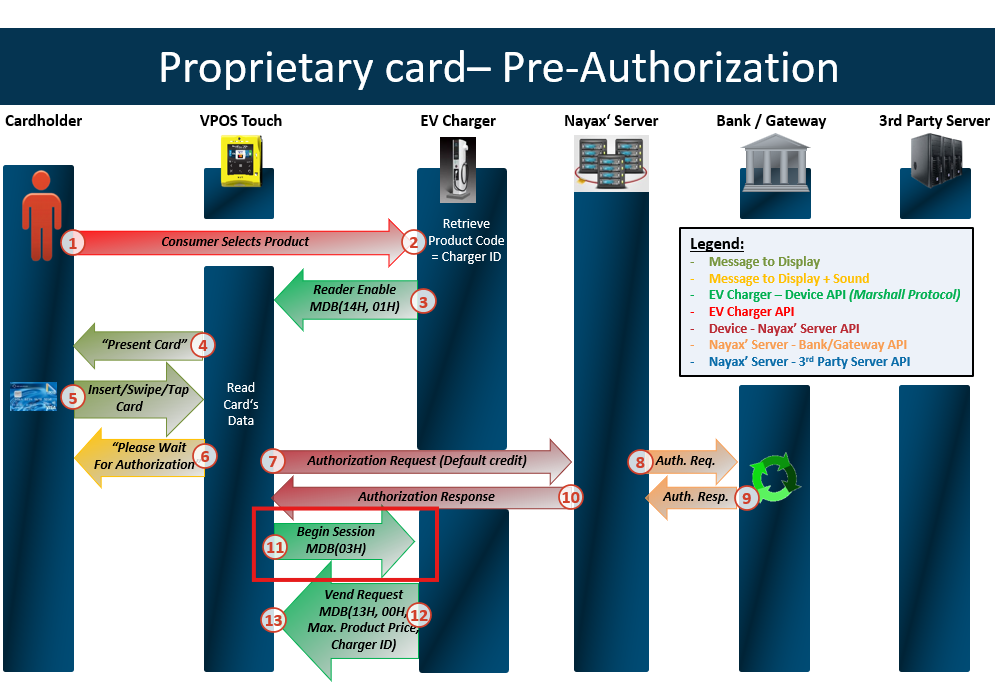
Otherwise, the "begin session" would come first, and the authorization would be done afterwards.
A close session must be performed when the VPOST/Onyx is in idle mode (not in the middle of an active transaction).
You must not send "Close Session" while you've got an active transaction, as it can cause issues: the device processes "Close Session" first, which can get the active transaction stuck.
Please ensure to send the "Close Session" command only when onReady is triggered.
Not charging consumers/ Close session with price of 0- what is the issue?
Regarding sending "close session" with price of 0- should you have liked to cancel the transaction, you should have sent a "close session" with the status that is not "ok", such as "failed to dispense" (as sending a "close session" with a price of 0 with status of "ok" is deemed as some sort of error with price calculation from your machine's end).
The reason is that anyone who would look at this device's virtual machine's last sales would think there is an issue on our end with settling the transaction (payment issues, configuration issues, etc.). In contrast, on your end there is no issue at all in the transaction process between your peripheral and the device, you just wanted to not charge the consumer due to your own reasoning.
That's why we have the "vend failure" option, as well as "close session" statuses of "vend failure" and "cancel by user" as those would indicate that the product was not provided, hence we wouldn't charge the consumer, and we'll show the matching reason on Last Sales/DTM.
Once you change the session's status to anything but "ok," the price you send along would be irrelevant, since the transaction would be deemed cancelled.
The possible statuses are:
0- Status Ok
1- User cancel
2- Failed to dispense the product
4- Vend denied
Then you can send the "Close Session" command.
Multivend: Example of How to Do Partial vVending
Partial vending is relevant only to Multivend and means that only some of the selected products could be vended.
For example, if the consumer selected five items:
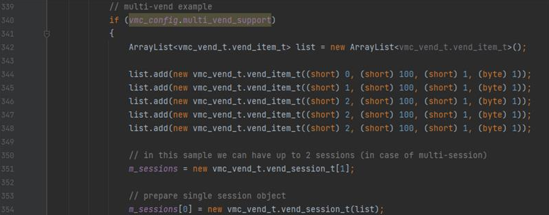
And want to simulate a scenario in which only two items were vended. You can add the following to your demo app inside the onVendApproved callback:
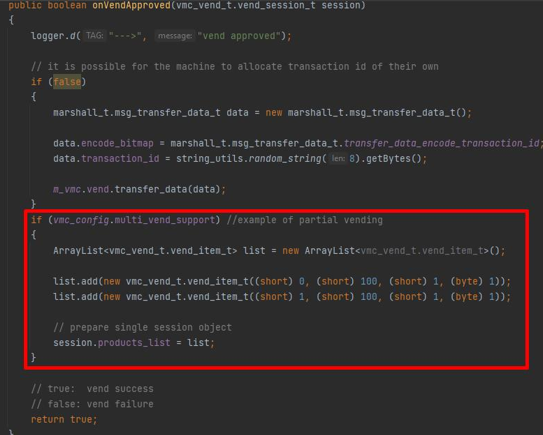
if (vmc_config.multi_vend_support) //example of partial vending
{
    ArrayList<vmc_vend_t.vend_item_t> list = new ArrayList<vmc_vend_t.vend_item_t>();

    list.add(new vmc_vend_t.vend_item_t((short) 0, (short) 100, (short) 1, (byte) 1));
    list.add(new vmc_vend_t.vend_item_t((short) 1, (short) 100, (short) 1, (byte) 1));

    // prepare single session object
    session.products_list = list;
}
if (vmc_config.multi_vend_support) //example of partial vending
{
List<vmc_vend_t.vend_item_t> list = new List<vmc_vend_t.vend_item_t>();
list.Add(new vmc_vend_t.vend_item_t((ushort)0, (ushort)10, (ushort)1, (byte)1));
list.Add(new vmc_vend_t.vend_item_t((ushort)1, (ushort)10, (ushort)1, (byte)1));
// prepare single session object
session = new vmc_vend_t.vend_session_t(list);
} session->products = &session_products[0];
session->total_products = 1;Session timeout- delayed by up to a minute
The device queries it's opened sessions every 1 minute, meaning there may be up to 1 minute delay in the device settling the transaction than the timeout defined in Nayax Core.
So for example:
If you set the timeout to be 1 minute, the session would expire anywhere between 1 minute to 1 minute and 59 seconds from starting it.
If you set the timeout to be 5 minute, the session would expire anywhere between 5 minutes to 5 minutes and 59 seconds from starting it.
If you set the timeout to be 1 hour, the session would expire anywhere between 1 hour to 1 hour and 59 seconds from starting it.
Updated about 2 months ago