
DynamicQR
Find quick answers and step-by-step guides for the most common questions about Nayax API integration, device configuration, transaction tracking, and deployment processes. Navigate the categories below to find solutions and best practices.
How to upload the logo to the devices?
Answer
The complete logo package is made up of five separate files, with each file serving a different purpose on the device (e.g., DQR payment method, brand selection screens).
1. File Delivery and Transfer
- Receive FTP Links: After the logo files are finalized, you will receive one unique FTP link per file.
- Transfer Files Individually: You must send each file separately to your device using its respective FTP link.
- Wait and Process: You must wait for the burning process to complete on the device after sending one file before you send the next one.
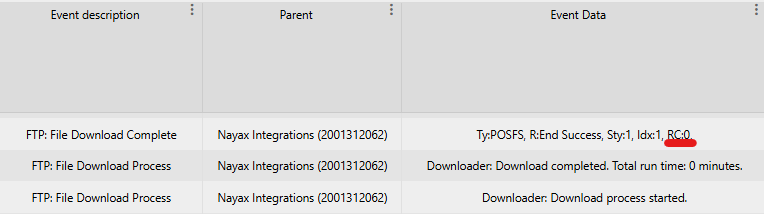
2. Monitoring the Burning Process
You can check the result of the file transfer and burning process in the Last Alerts section of your device management system.
The result is indicated by the Return Code (RC) displayed in the top line of the alert.
| Return Code | Status | Description |
|---|---|---|
| RC0 | Successful | The file was burned and installed successfully. |
| RC17 | Unsuccessful | The file already exists on the device. |
| RC41 | Unsuccessful | Bad or no response was received from our server. |
| Any other value | Unsuccessful | Indicates a failure in the burning process. |
The FTP links would be of the following format:
4010000;devicecoreftp.nayax.net;21;embeddedro;Ioh1Eqgv;/PaymentIcons/CustomerName/PI/CustomerNameButton.png;;8b41;PI\CustomerNameButton.png;


4010000;devicecoreftp.nayax.net;21;embeddedro;Ioh1Eqgv;/PaymentIcons/CustomerName/PI/CustomerNameLargerot.png;;5168;PI\CustomerNameLargerot.png;


4010000;devicecoreftp.nayax.net;21;embeddedro;Ioh1Eqgv;/PaymentIcons/CustomerName/PI/CustomerNameMediumrot.png;;624f;PI\CustomerNameMediumrot.png;


4010000;devicecoreftp.nayax.net;21;embeddedro;Ioh1Eqgv;/PaymentIcons/CustomerName/PI/CustomerNameSmallrot.png;;f8c4;PI\CustomerNameSmallrot.png;


4010000;devicecoreftp.nayax.net;21;embeddedro;Ioh1Eqgv;/PaymentIcons/CustomerName/QrLogo/CustomerNameSquare_105.png;;b290;QrLogo\CustomerNameSquare_105.png;
Should you have multiple channels, you would have places where there's "CustomerName" for each channel.
For example, if I have 2 channels called "ChannelA" and ChannelB"- you would get 10 files (5 images per channel) and the format would look something like this:
4010000;devicecoreftp.nayax.net;21;embeddedro;Ioh1Eqgv;/PaymentIcons/ChannelA/PI/CustomerNameButton.png;;8b41;PI\ChannelAButton.png;

4010000;devicecoreftp.nayax.net;21;embeddedro;Ioh1Eqgv;/PaymentIcons/ChannelA/PI/CustomerNameLargerot.png;;5168;PI\ChannelALargerot.png;

4010000;devicecoreftp.nayax.net;21;embeddedro;Ioh1Eqgv;/PaymentIcons/ChannelA/PI/CustomerNameMediumrot.png;;624f;PI\ChannelAMediumrot.png;

4010000;devicecoreftp.nayax.net;21;embeddedro;Ioh1Eqgv;/PaymentIcons/ChannelA/PI/CustomerNameSmallrot.png;;f8c4;PI\ChannelASmallrot.png;

4010000;devicecoreftp.nayax.net;21;embeddedro;Ioh1Eqgv;/PaymentIcons/ChannelA/QrLogo/CustomerNameSquare_105.png;;b290;QrLogo\ChannelASquare_105.png;


4010000;devicecoreftp.nayax.net;21;embeddedro;Ioh1Eqgv;/PaymentIcons/ChannelB/PI/CustomerNameButton.png;;8b41;PI\ChannelBButton.png;

4010000;devicecoreftp.nayax.net;21;embeddedro;Ioh1Eqgv;/PaymentIcons/ChannelB/PI/CustomerNameLargerot.png;;5168;PI\ChannelBLargerot.png;

4010000;devicecoreftp.nayax.net;21;embeddedro;Ioh1Eqgv;/PaymentIcons/ChannelB/PI/CustomerNameMediumrot.png;;624f;PI\ChannelBMediumrot.png;

4010000;devicecoreftp.nayax.net;21;embeddedro;Ioh1Eqgv;/PaymentIcons/ChannelB/PI/CustomerNameSmallrot.png;;f8c4;PI\ChannelBSmallrot.png;

4010000;devicecoreftp.nayax.net;21;embeddedro;Ioh1Eqgv;/PaymentIcons/ChannelB/QrLogo/CustomerNameSquare_105.png;;b290;QrLogo\ChannelBSquare_105.png;
When should I send the logos?
Answer
You only need to send the logo files once per device.
Once you send the logos and confirm a successful burn (indicated by an RC0 in Last Alerts), the files are permanently stored on that device.
- The logos will remain on the device even if you perform a simple reset or a full reset-default of the machine.
- You do not need to send them again unless the logo design itself changes, requiring a new file deployment.
Which image type should you send us for the logo?
Answer
To ensure the best possible display across all devices, we strongly prefer the image file type you should submit.
1. Preferred Format: SVG (Scalable Vector Graphics)
- Format: SVG
- Key Advantage: SVG is a vector format, meaning its resolution is independent of size. You can scale it infinitely without any loss of quality or pixelation, and its file size remains minimal.
2. Alternative Format: PNG
- Format: PNG
- Requirement: If SVG is not available, provide a PNG image of the maximum size and highest resolution possible.
3. Image Reference
- Format: Image Reference (URL/Source)
- Use Case: Sending a link or reference to the source image is also acceptable if a direct file submission is difficult.
Once we receive your image(s) or references, we will process them internally to ensure they are optimized and displayed correctly on our devices.
Updated 2 months ago