
Multi-Session
The Multi-Session payment flow separates the consumer interaction into two distinct parts:
- Product selection.
- Authorization and settlement of the consumer’s card.
This differs from the Single-Session flow, in which settlement is performed immediately after product selection and authorization.
Settlement timeout
Settlement should occur anywhere between 1 minute and 71 hours (the exact value depends on a parameter called "Session timeout" in Nayax Core) after authorization process was completed.
Note that in case of the machine not sending a settlement command within a timeframe set in "Session timeout" parameter in Nayax Core- the device would settle the transaction on it's own and notify the peripheral about it via "Status" command.
For VPOSM- it's possible to have the transaction be cancelled instead of settled in case of timeout- but that would be possible via additional configuration on Nayax Core (unrelated to the Marshall flow- meaning from Marshall's POV, the device would always try and settle the transaction at session timeout).
It's important that peripherals do not count on the Session Timeout mechanism as it's strictly a fallback mechanism from the device's end.
Meaning the peripheral should always send a settlement command, and in case of not wanting to charge the consumer he can change one of the settlements fields, called "status" (unrelated to the "Status" command) to a status of "Vend failure" for example- more on that in Multisession- not charging a consumer at settlement stage
Why Use Multi-Session
The Multi-Session flow enables you to manage multiple concurrent transactions on a single device. It is ideal for peripherals with longer transaction times or those that serve several consumers simultaneously.
Concurrent Transactions
This flow is applicable in environments such as EV chargers, where multiple consumers may use the same station simultaneously but require independent payment processing.
Longer Transaction Times
Multi-Session is also helpful when the vending process is longer than the standard 4 minutes and 15 seconds.
The flow allows the peripheral to notify the Nayax Device that vending can begin immediately after the card is authorized. The Nayax Device then waits for a later update from the peripheral regarding the final vend status or service stop, which enables settlement.
Quicker Credit Release
The Multi-Session flow functions technically as a Pre-Selection flow. For some acquirers, this architecture can lead to a quicker release of captured credit than the Single-Session flow with Pre-Authorization.
If you use Single-Session with Pre-Authorization, the authorized credit amount may take days or weeks to be released, which can confuse consumers who may think they were charged the full Pre-Authorization amount. Multi-Session helps mitigate this issue.
Payment Flow
The diagrams below illustrate the sequence of events within the Multi-Session payment flow.
In this flow there are two parts to the transaction process, therefore the are two separate diagrams, one for each step.
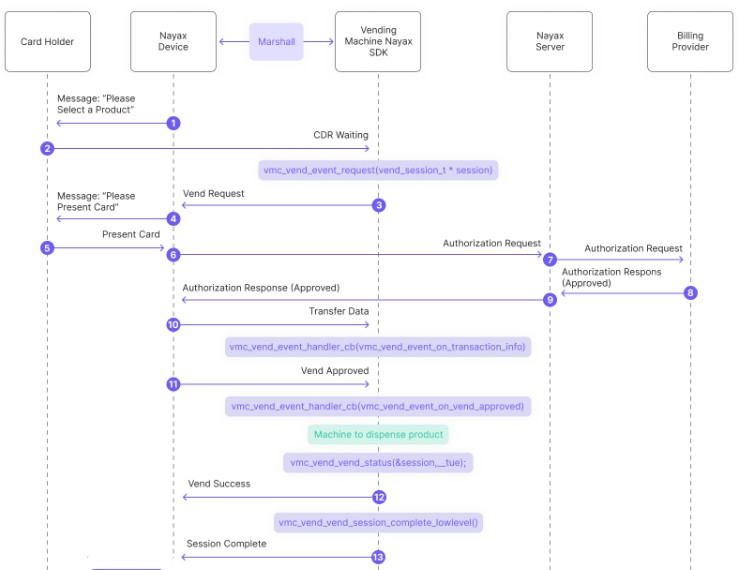

Below is a breakdown of the diagram:
- The Nayax Device sends a message to the consumer: "Please Select a Product."
- The consumer selects a product for the vending machine.
- The peripheral's SDK sends a vending request to the Nayax Device:
vmc_vend_vend_request(vend_session_t *session)vmc_instance.vend.vend_request(session);m_vmc.vend.vend_request(m_sessions[m_active_session]); - The Nayax Device sends a message to the consumer: "Please Present Card."
- The consumer presents their payment card.
- The Nayax Device sends an authorization request to the Nayax Server.
- The Nayax Server forwards the authorization request to the Billing Provider.
- The Billing Provider sends an authorization response (approved) to the Nayax Server.
- The Nayax Server sends the authorization response (approved) back to the Nayax Device.
- The peripheral's SDK handles transaction data received from the Nayax Device via Transfer Data (said data includes information about the Nayax transaction ID and the consumer's card details):
vmc_vend_event_handler_cb(vm_vend_event_on_transaction_info)vend_callbacks(onTransactionInfo(data))vmc_vend_events() (via onTransactionInfo(data)) - The SDK triggers "Vend Approved" events:
vmc_vend_event_handler_cb(vm_vend_event_on_vend_approved)vend_callbacks() (via onVendApproved(session))vmc_vend_events() (via onVendApproved(session)) - The peripheral starts dispensing the product/ providing the service to the consumer.
- The SDK reports "vend success":
and completes the vend session:
vmc_vend_vend_status(&session, __true)vmc_vend_events() (via onVendApproved(session) -which would return "true")vmc_vend_events() (via onVendApproved(session) -which would return "true")vmc_vend_vend_session_complete_lowlevel()no such function in C# or Java due to the nature of the languagesno such function in C# or Java due to the nature of the languages - The first part of the transaction ends.
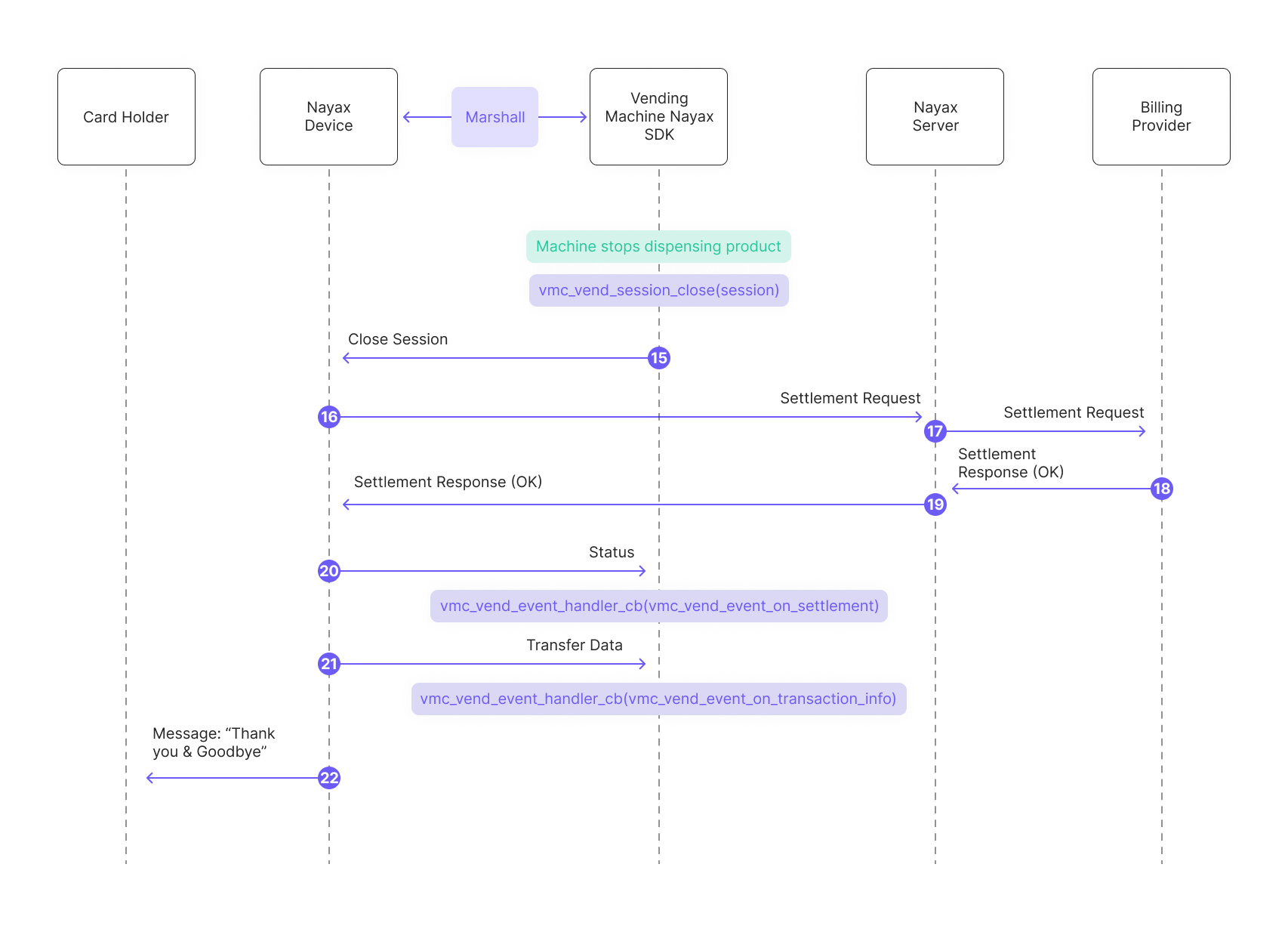
- The machine finishes dispensing the product/providing the service.
- Vending machine SDK settles the transaction (session):
vmc_vend_session_close(session)vmc_instance.vend.session_close(session)m_vmc.vend.session_close(session) - The Nayax Server forwards the settlement request to the Billing Provider.
- The Billing Provider sends a settlement response (OK) to the Nayax Server.
- Nayax Server returns the settlement response (OK) to the Nayax Device.
- The peripheral's SDK receives a status command regarding the settlement (whether the device was able to settle it or not) and triggers a "settlement" event:
vmc_vend_event_handler_cb(vm_vend_event_on_settlement)vmc_vend_events() (via onSettlement(success) -which would return "true")vmc_vend_events() (via onSettlement(success) -which would return "true") - Vending machine SDK transfers data and triggers a "transaction info" event:
vmc_vend_event_handler_cb(vm_vend_event_on_transaction_info)vmc_vend_events() (via onTransactionInfo(data))vmc_vend_events() (via onTransactionInfo(data)) - Message to the consumer: "Thank you & Goodbye."
See also
Updated about 1 month ago