
How to upload the logo to the devices?
The complete logo package is made up of five separate files, with each file serving a different purpose on the device (e.g., DQR payment method, brand selection screens).
1. File Delivery and Transfer
- Receive FTP Links: After the logo files are finalized, you will receive one unique FTP link per file.
- Transfer Files Individually: You must send each file separately to your device using its respective FTP link.
- Wait and Process: You must wait for the burning process to complete on the device after sending one file before you send the next one.
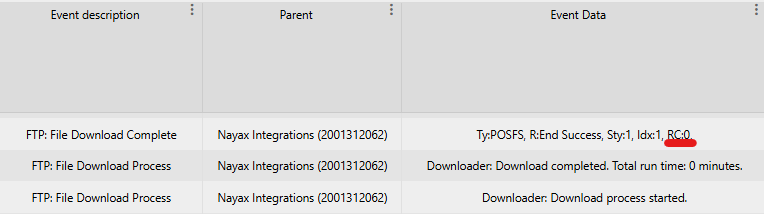
2. Monitoring the Burning Process
You can check the result of the file transfer and burning process in the Last Alerts section of your device management system.
The result is indicated by the Return Code (RC) displayed in the top line of the alert.
| Return Code | Status | Description |
|---|---|---|
| RC0 | Successful | The file was burned and installed successfully. |
| RC17 | Unsuccessful | The file already exists on the device. |
| RC41 | Unsuccessful | Bad or no response was received from our server. |
| Any other value | Unsuccessful | Indicates a failure in the burning process. |
The FTP links would be of the following format:
4010000;devicecoreftp.nayax.net;21;embeddedro;Ioh1Eqgv;/PaymentIcons/CustomerName/PI/CustomerNameButton.png;;8b41;PI\CustomerNameButton.png;


4010000;devicecoreftp.nayax.net;21;embeddedro;Ioh1Eqgv;/PaymentIcons/CustomerName/PI/CustomerNameLargerot.png;;5168;PI\CustomerNameLargerot.png;


4010000;devicecoreftp.nayax.net;21;embeddedro;Ioh1Eqgv;/PaymentIcons/CustomerName/PI/CustomerNameMediumrot.png;;624f;PI\CustomerNameMediumrot.png;


4010000;devicecoreftp.nayax.net;21;embeddedro;Ioh1Eqgv;/PaymentIcons/CustomerName/PI/CustomerNameSmallrot.png;;f8c4;PI\CustomerNameSmallrot.png;


4010000;devicecoreftp.nayax.net;21;embeddedro;Ioh1Eqgv;/PaymentIcons/CustomerName/QrLogo/CustomerNameSquare_105.png;;b290;QrLogo\CustomerNameSquare_105.png;
Should you have multiple channels, you would have places where there's "CustomerName" for each channel.
For example, if I have 2 channels called "ChannelA" and ChannelB"- you would get 10 files (5 images per channel) and the format would look something like this:
4010000;devicecoreftp.nayax.net;21;embeddedro;Ioh1Eqgv;/PaymentIcons/ChannelA/PI/CustomerNameButton.png;;8b41;PI\ChannelAButton.png;

4010000;devicecoreftp.nayax.net;21;embeddedro;Ioh1Eqgv;/PaymentIcons/ChannelA/PI/CustomerNameLargerot.png;;5168;PI\ChannelALargerot.png;

4010000;devicecoreftp.nayax.net;21;embeddedro;Ioh1Eqgv;/PaymentIcons/ChannelA/PI/CustomerNameMediumrot.png;;624f;PI\ChannelAMediumrot.png;

4010000;devicecoreftp.nayax.net;21;embeddedro;Ioh1Eqgv;/PaymentIcons/ChannelA/PI/CustomerNameSmallrot.png;;f8c4;PI\ChannelASmallrot.png;

4010000;devicecoreftp.nayax.net;21;embeddedro;Ioh1Eqgv;/PaymentIcons/ChannelA/QrLogo/CustomerNameSquare_105.png;;b290;QrLogo\ChannelASquare_105.png;


4010000;devicecoreftp.nayax.net;21;embeddedro;Ioh1Eqgv;/PaymentIcons/ChannelB/PI/CustomerNameButton.png;;8b41;PI\ChannelBButton.png;

4010000;devicecoreftp.nayax.net;21;embeddedro;Ioh1Eqgv;/PaymentIcons/ChannelB/PI/CustomerNameLargerot.png;;5168;PI\ChannelBLargerot.png;

4010000;devicecoreftp.nayax.net;21;embeddedro;Ioh1Eqgv;/PaymentIcons/ChannelB/PI/CustomerNameMediumrot.png;;624f;PI\ChannelBMediumrot.png;

4010000;devicecoreftp.nayax.net;21;embeddedro;Ioh1Eqgv;/PaymentIcons/ChannelB/PI/CustomerNameSmallrot.png;;f8c4;PI\ChannelBSmallrot.png;

4010000;devicecoreftp.nayax.net;21;embeddedro;Ioh1Eqgv;/PaymentIcons/ChannelB/QrLogo/CustomerNameSquare_105.png;;b290;QrLogo\ChannelBSquare_105.png;
Updated 3 months ago